Connecting a 4S Battery management system also known as BMS to lithium ion battery is easy and not much complicated. In this article I’m solving the connection doubts and charging and load connection information’s. I hope many of beginners in electronics who confused with the connections.
4S Lithium Battery Pack Wiring Diagram
What Is a 4S Battery Configuration?
The 4S battery configuration means the four lithium ion batteries or lithium polymer cells which are connected in series and which will results in high voltage. Because each batteries voltage get summed like total voltage is B1+B2+B3+B4. In series connection the positive terminal of battery B1 is connected to the negative terminal of second battery. This configuration is common in electric bike or autorickshaw and solar power storage systems.
Each lithium ion battery normal voltage range is around 3.7V. Then the total voltage of the 4S battery should be 14.8V. When the battery fully charged each battery reaches the 4.2V and full charge voltage is 16.8V.
The BMS monitor device charging individual battery connected in series. This BMS board protects the battery from over charging and over discharging. Right wiring and connection is important for working the 4S battery system properly.
How a 4S Battery Management System (BMS) Works
The 4S battery management system (BMS) is a specially designed circuit to properly charge and discharge the battery. It continuously monitor and charging the four individual lithium ion batteries. During charging BMS the cell from exceeding 4.2V per cell.
if one or more cells reaches the limit The BMS disconnects the charging process or balancing the total charging voltage. This balancing give same voltage across the each cells.
when the battery is connected to a load, The BMS is protects the battery from over discharging. The BMS will disconnect the output power to the load. The minimum safe voltage around is 2.5V to 3.0V per cell. Also provides over current and short circuit protection.
Understanding the B+, B−, B1, B2, B3, P+ and P− Terminals In 4S BMS Connection
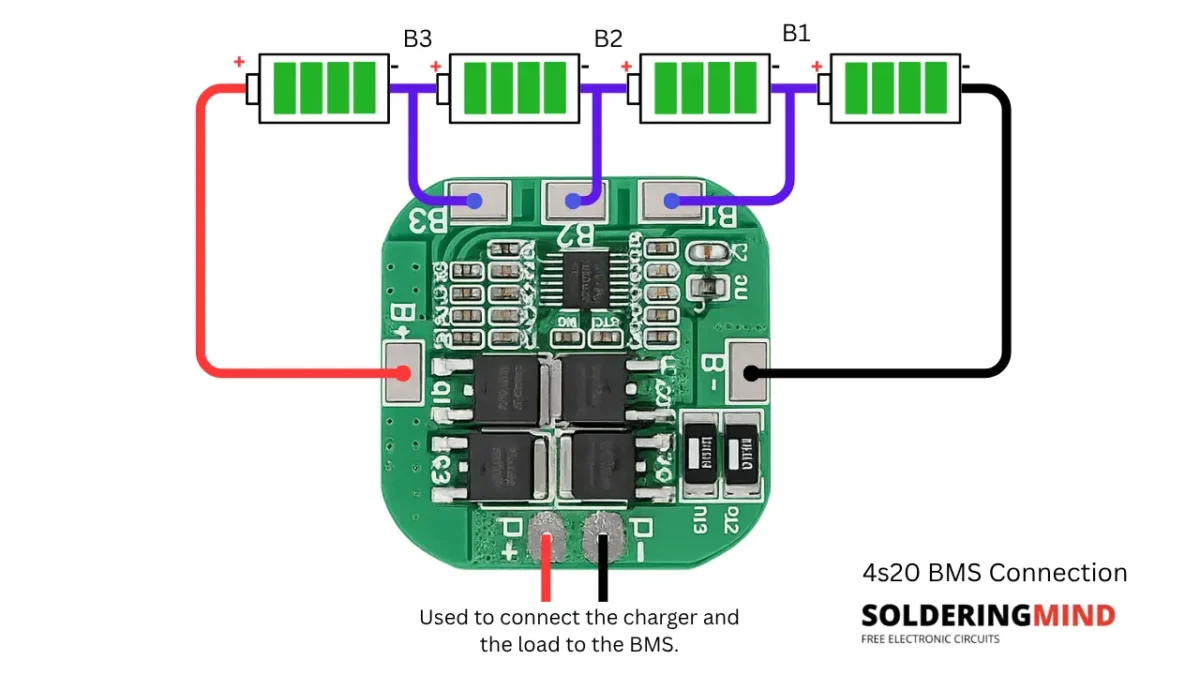
The 4S BMS has terminals of B+, B−, B1, B2, B3, P+, and P−. The B terminals connect directly to the battery cells. Where B+ is series connected +ve supply and B- is negative supply of series battery. B1 is connects between battery 1 and 2, B2 connects the junction of battery 2 and 3. The B3 connects between battery 3 and 4. The P+ and P- in the BMS is charging input or load output pin.
How to Connect Four 18650 Cells in Series
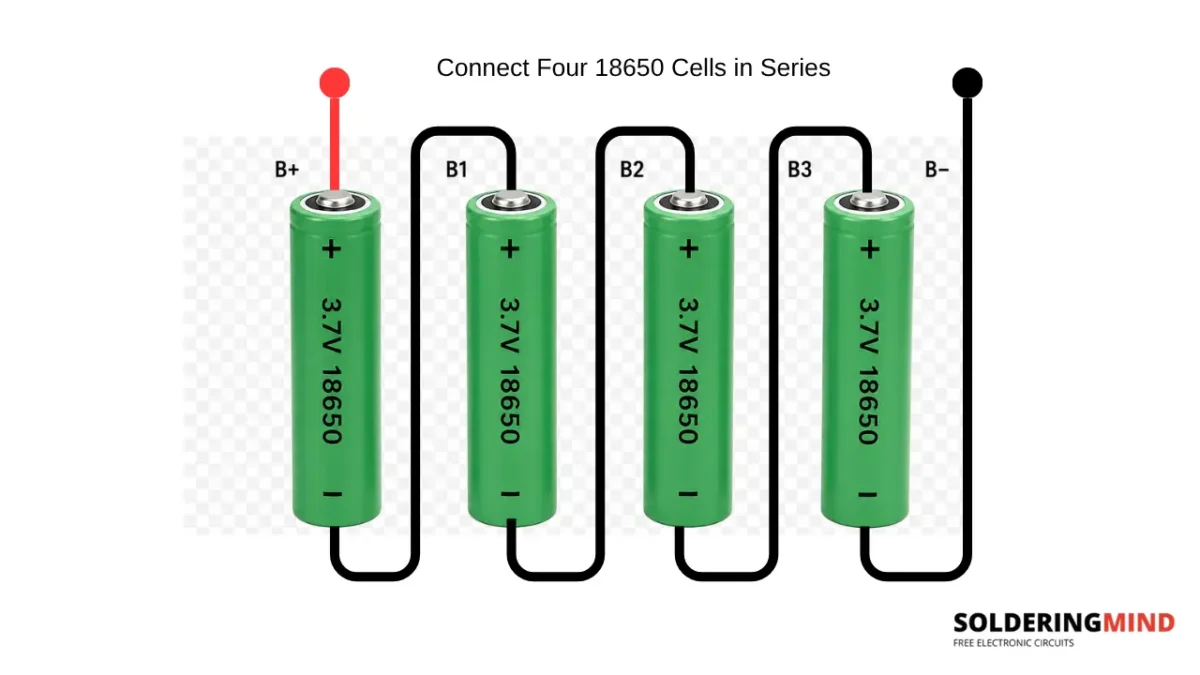
Connect four 18650 lithium battery makes ready for 4S battery pack. The positive terminal of the cell 1 is positive supply and it is marked as B+. Negative terminal of the cell 4 is B- marking. The remaining connections of B1, B2 and B3 connected to the BMS board. This series arrangement of battery each cells voltage is added and gets around 14.8V and up to 16.8V in fully charged condition.
How to Connect the Charger and Load to the BMS
All the connections are done properly, then the next you need to know how to charge and how to connect load to the battery. In the BMS board the marking of P+ and P- is the only one connection for charging and connecting load. if you want to charge the battery give 16.8V through this pin. If you want to take charge out connect the same pin to get output DC voltage.
Charging a 4S Lithium Battery Pack Safely
To charge the lithium battery using the BMS board always use a 16.8V lithium ion battery charger. This voltage is only for the 4S battery setup. The BMS board charging each cell separately and turn OFF charging until 4.2V reached.
How to Test the 4S Battery Pack with a Multimeter
To test the 4S batter pack using multimeter, you need to set the multimeter knob to DC voltage measuring mode. Place the red probe in B+ and black probe to B-. This will shows the total voltage of the battery. A fully charged 4S battery pack shows 16.8V and nominal voltage is about 14.8V. Each healthy cells shows the voltage range of 3 to 4.2V also.