The Internet clock is a device which Displays the internet time by pulling the exact time from the Internet time server such as Network time protocol (NTP). In this project i’am sharing the circuit diagram, programming code and its connection instructions to Build an Internet clock using ESP8266 board.
Internet Clock Circuit Diagram
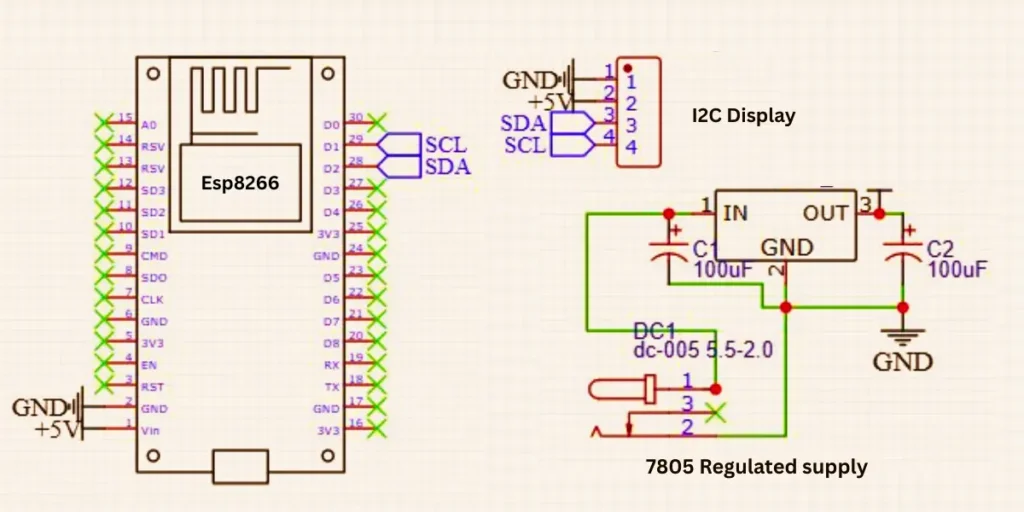
Connections and Working
The given circuit diagram is a basic Internet clock circuit using an ESP8266 microcontroller and I2C display. A regulated 5V power supply using a 7805 voltage regulator is also given. The power section a DC power jack is using for input voltage of around 7V to 12V DC. This voltage is filtered by a 100µF capacitor and then regulated by the 7805 voltage regulator, which gives a steady 5V at output. Another 100µF capacitor is placed on the output to smoothen the voltage.
The regulated 5V output is connected to the “V_in” pin of the ESP8266 module. which then internally converts it to 3.3V for its own operation. Ground from the power supply is shared across the entire circuit. The ESP8266 is shown with labeled pins such as D1 and D2 which are used to communicate with the I2C display. The D1 is connects to the SCL line and D2 connects to the SDA line of the I2C display.
The I2C display module also receives power from the 5V and GND lines. This allows the ESP8266 to send time data over the I2C interface, which can be fetched from the internet using NTP (Network Time Protocol) and display it on the screen.
ESP8266 NodeMCU Based Internet Clock PCB
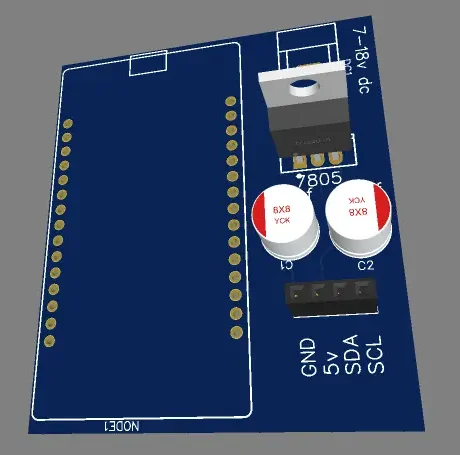
ESP8266 Programming Code for Internet Clock
#include <Wire.h>
#include <LiquidCrystal_I2C.h>
#include <ESP8266WiFi.h>
#include <WiFiUdp.h>
#include <NTPClient.h>

// WiFi Credentials
const char* ssid     = "SSID";
const char* password = "Password";

// Set up I2C LCD (16x2, Address: 0x27 or 0x3F)
LiquidCrystal_I2C lcd(0x3F, 16, 2);

// NTP Setup
WiFiUDP ntpUDP;
NTPClient timeClient(ntpUDP, "pool.ntp.org", 19800, 60000); // UTC+5:30 for IST

void setup() {
    Serial.begin(115200);
    lcd.init();
    lcd.backlight();

    // Connect to WiFi
    WiFi.begin(ssid, password);
    lcd.setCursor(0, 0);
    lcd.print("\x7E Connecting...");
    while (WiFi.status() != WL_CONNECTED) {
        delay(500);
        Serial.print(".");
    }
    lcd.clear();
    lcd.setCursor(0, 0);
    lcd.print("\x7E WiFi Connected");
    delay(1000);
    lcd.clear();

    timeClient.begin();
}

void loop() {
    timeClient.update();

    int rawHour = timeClient.getHours();
    int minutes = timeClient.getMinutes();
    int seconds = timeClient.getSeconds();
    int day = timeClient.getDay();
    int totalDays = timeClient.getEpochTime() / 86400; // Calculate days from epoch
    int year = 1970 + totalDays / 365; // Approximate year
    int month = (totalDays % 365) / 30 + 1; // Approximate month
    int date = (totalDays % 365) % 30 + 1; // Approximate date

    // Convert to 12-hour format
    String ampm = (rawHour >= 12) ? "PM" : "AM";
    int hour = rawHour % 12;
    if (hour == 0) hour = 12;

    // Days of the week
    String weekDays[] = {"Sun", "Mon", "Tue", "Wed", "Thu", "Fri", "Sat"};
    String currentDay = weekDays[day];

    // Display Time with Clock Symbol
    lcd.setCursor(0, 0);
    lcd.printf("\x7E %02d:%02d:%02d %s", hour, minutes, seconds, ampm.c_str());

    // Display Date & Weekday with Calendar Symbol
    lcd.setCursor(0, 1);
    lcd.printf("\x7F %02d/%02d/%04d %s", date, month, year, currentDay.c_str());

    delay(1000);
}
From the programming code change the WiFi credentials with your own WiFi username and password to get connect with internet.