The USB Type-A connectors are the most common and widely used to interfaces for connecting computer peripherals such as keyboards, mouse, storage devices and many other USB powered external accessories. So understanding the pinout of Type A connectors is essential before doing electronics projects, repairs and custom cable works. In this guide explains the USB pinout, functions of each pin and differences between male and female connectors.
Overview of USB Type-A Connectors
The USB Type-A is the standard rectangular connector, which is found on computers, power adapters and various electronic devices. It has four pins in USB 1.x and 2.0 versions and nine pins in USB 3.x versions. The basic USB 2.0 pinout remains the same across nearly all Type-A plugs and ports. The Type A has,
- Male connector: Plug (on a cable)
- Female connector present on a device in common.
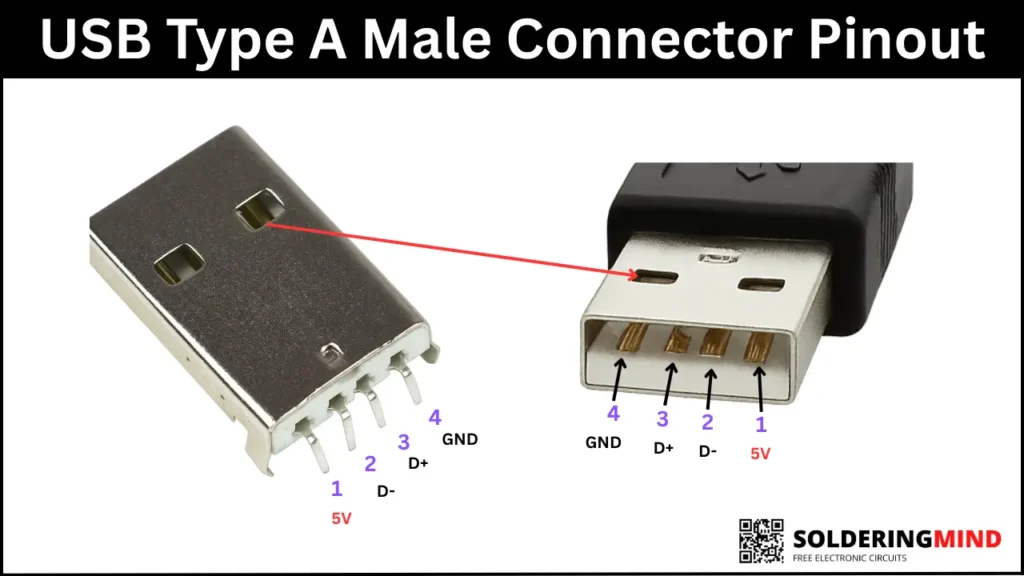
Standard USB 2.0 Type-A Male Connector Pinout
As an Amazon Associate, I earn from qualifying purchases.
USB Male Type A Plug 90 Degree 4-Pin SMD SMT Jack Solder Connector – 10 Pcs
- MALE USB PORT TYPE – A
- PIN – 180 DEGREE PIN
- METAL – STAINLESS STEEL BODY
- COMPATIBLE – USB 2.0 & USB 3.0
- INPUT- 5V TO 12V
Type A Female Connector Pinout
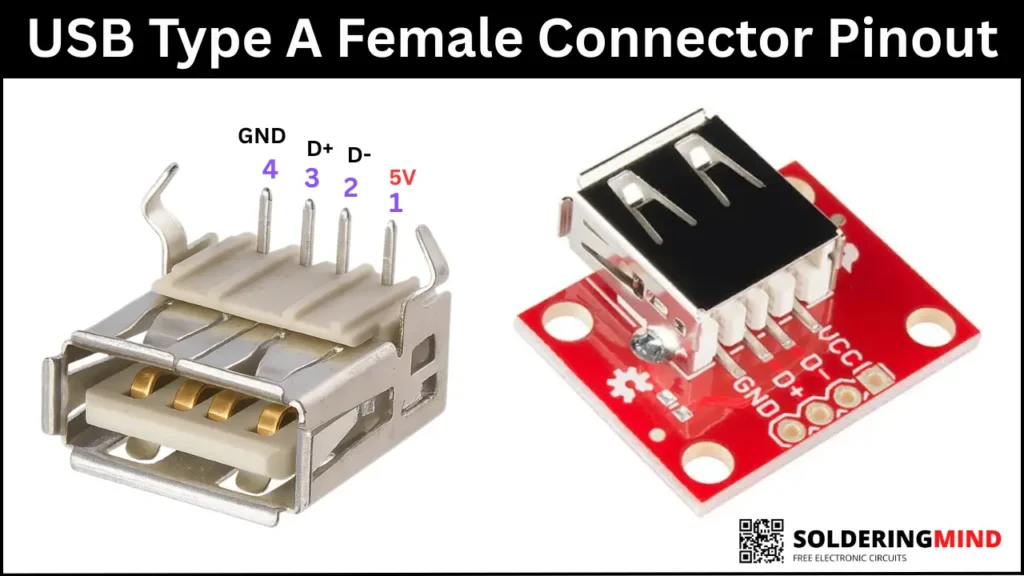
As an Amazon Associate, I earn from qualifying purchases.
USB Female Type A 4-Pin DIP Right Angle Plug Jack Socket Connector LW – 10 Pcs
- FEMALE USB TYPE A
- METAL – STAINLESS STEEL
- INPUT- 5V TO 12V
- COMPATIBLE- WITH USB 2.0 & 3.0
- APPLICATION: AUDIO , POWER, DIGITAL INPUT AND OUTPUT, AUTOMBILE, POWER BANKS
Pin Functions
| Pin | Name | Standard Color | Description |
|---|---|---|---|
| 1 | 5V | Red | Provides +5V power to the device |
| 2 | D− | White | Differential data signal (negative) |
| 3 | D+ | Green | Differential data signal (positive) |
| 4 | GND | Black | Ground |
USB 3.x Type-A Additional Pins
The USB 3.0 and later versions added five more pins for SuperSpeed data transfer. So this will increasing the total pins to nine. These extra pins are located deeper inside the connector so that USB 3.0 features remain backward compatible.
Added pins include:
Two transmit pairs (TX+ and TX−) and Two receive pairs (RX+ and RX−) and additional Ground reference for SuperSpeed signals
The USB 3.x Type-A plug will work in a USB 2.0 port, but only gets USB 2.0 speeds.
USB Wire Color Coding
Most USB Type-A cables use standardized wire colors for identifications, the list of color based pinout is given below,
- Red – +5V Power
- White – Data−
- Green – Data+
- Black – Ground
- Blue – SuperSpeed TX
- Yellow / Orange – SuperSpeed RX
(Colors may vary on cheaper cables, so verify before wiring.)
Conclusion
The USB Type A connectors is an essential part of modern electronics and computer technologies. Knowing the pinout for both the male plug and female port is makes a safely wire, repair and use USB components in various electronics projects also. Whether you’re debugging a connection or building a custom cable, the standard 4 pin layout of type A is help you.